
GOM Player+User Guide
Setting Preferences
Playback 360 VR Video
Move 360︒ VR video left or right directions with a keyboard or mouse. On the touch screen, you can also use touch gestures.

If you click “Playback 360︒ VR Video”( ) icon, a pop-up menu will appear.
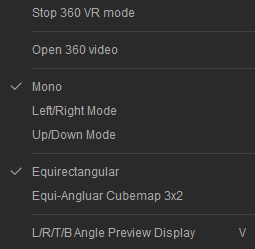
Playback 360 VR Video
| Playback 360︒VR mode | Start VR mode. If you start VR mode, it will turn into 360︒VR Mode stop menu, and if you select it again, the VR mode will stop. |
|---|---|
| Import 360︒ Videos |
Able to import 360︒video files.
|
| VR mode Settings |
Able to set up a type of videos to be used in a VR mode.
|
| VR Mapping Setting |
You can set up a mapping when converting a 3D image to be used in VR mode into a 2D image.
|