Black Friday 55% Sale + $10 Credits✨ Shop Now
Black Friday 55% Sale + $10 Credits✨
gom lab
  • GOM Easy Pass GOM Easy Pass Premium Ticket
  • Software
    • Video Editing

      GOM Mix GOM Mix
    • Video Recording

      GOM Cam GOM Cam
    • Video Playback

      GOM Player+ GOM Player+
      GOM Player GOM Player
    • Image Editing

      GOM Pic GOM Pic
    AI Credit Launch Make Editing Easier!
  • Plans & Pricing
  • Support
    • Learn

      User Guide
      FAQ
      Blog
    • Resource Center

      Download
      Subtitles
      Codec
    • About License

      Find your License key
      Deauthorize your PC
      Automatic Payment Details
    • Support

      1:1 Support
      Notice
  • Business
    Sign in Recharge Credits

GOM PlayerUser Guide

    • [Windows] Basic Configuration
    • [Windows] Learn about Basic Menu
    • [Mac] Basic Configuration
    • [Mac] Learn about Basic Menu
    • [Windows] How to Play General Videos
    • [Windows] How to Play DVDs
    • [Windows] How to Play VR Video
    • [Windows] How to Use Favorites
    • [Mac] How to Play PC file Videos
    • [Mac]How to Play Open an URL
    • [Windows] Playback 360 VR Video
    • [Windows] Subtitle Helper
    • [Windows] Save Current Frame
    • [Windows] Control Panel
    • [Mac] Control Panel
    • [Mac] How to Use Preferences
    • [Windows] How to Capture Audio
    • [Windows] How to Use Text-To-Speech (TTS)
    • [Windows] Find Codec Window

Save the Current Frame

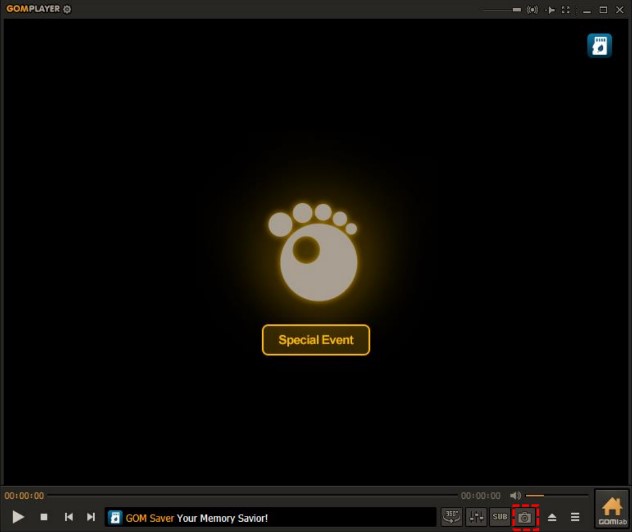
Able to capture and store the currently featured screen in the currently playing video. If you click the Save Current the Current Frame() icon, the currently playing video image is captured and stored.

  • Before
  • Next
BLACK FRIDAY 55% SALE + $10, BLACK FRIDAY 50% OFF

Quick Menu

  • 문의하기
  • Top

Notice

  • [GOM Lab] Change to Privacy Policy of GOM Lab
  • [Business] Changes to the standard for setting the start date of Paid Software Licenses

Support Center

Support Center
1:1 Support

Available 365 days a year | We will respond sequentially during Support center hours.

We will respond sequentially during Support center hours.

  • About Company
  • Paid Services Policy
  • Advertising / Partnership
  • Terms and Conditions
  • See all services
  • Privacy Policy
  • Youth Protection Policy
GOM & COMPANY
GOM & Company CEO: Lee Byungki Business Reg. No: 120-81-86669
Online Sales Reg. No: 2023-Seoul Songpa-6056 Address: (GOM&Company Bldg) 16, Munjeong-ro4-gil, Songpa-gu, Seoul, Republic of Korea
  • Youtube
  • Facebook
global

Country

Copyright ©2023 GOM&COMPANY All rights reserved