
GOM Mix ProUser Guide
Edit Selected Audio
Using the built-in audio editor, you can partially extract the audio or apply the fade in/out effect.
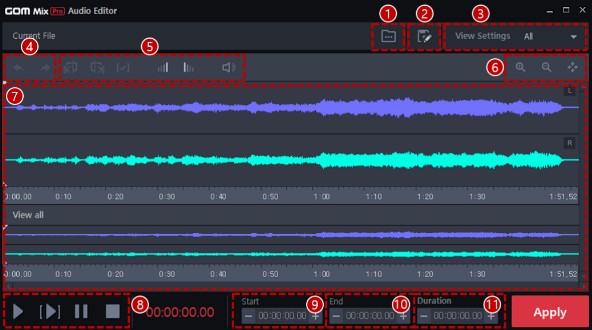
To edit an audio source, choose the audio source to edit in the timeline and click the Edit Selected Audio ( ) icon > Edit … The audio editor window opens.
-
①
Open Audio(
 )
)
Opens a new audio file.
-
②
Save as(
 )
)
Saves the edited audio file as a different name.
-
③
View
Audio channel options to be displayed in the audio waveform display.
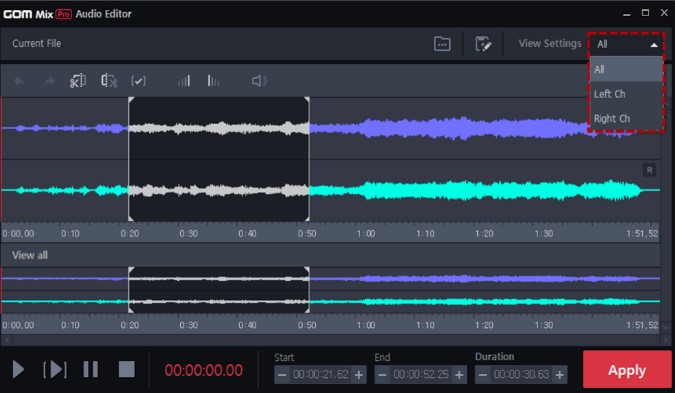
- All: Displays both the left and right channels.
- Left Ch: Displays the left channel only.
- Right Ch: Displays the right channel only.
-
④
Undo / Redo(
 /
/  )
)
Undo or redo an edit.
- Undo (): Reverses the last edit. Up to 300 edit operations can be undone.
- Redo (): Restores the reversed edit again.
- Undo (
-
⑤
Edit Tool
You can extract a part of the audio or add a special audio effect.
- Remove selection(
 ): Removes the selected waveform from the audio timeline.
 - Crop selection(
 ): Leaves the selected audio waveform and removes the rest.
 - Cancel selection(
 ): Deselects the part in the audio timeline.
 - Fade in/out(
 /
/ ): Applies the fade in/out effect to the selection in the audio timeline.
 - Volume control(
 ): Adjusts the volume of the selection in the audio timeline.
- Remove selection(
-
⑥
Zoom In/Out
Zooms in or out the audio timeline.
- Zoom in(
 ): Enlarges the timeline. The time per ruler decreases.
 - Zoom out(
 ): Reduces the timeline. The time per ruler increases.
 - Full view(
 ): Displays the entire waveform in the timeline.
- Zoom in(
-
⑦
Audio Timeline
Plays all the audio waveforms in the audio timeline.
-
⑧
Playback
Plays the audio displayed in the audio timeline.
- Play all(
 ): Plays all the audio waveforms in the audio timeline.
 - Play selection(
 ): Plays the selected waveform only.
 - Pasuse(
 ): Pauses the audio sound.
 - Stop(
 ): Stops the audio sound.
- Play all(
-
⑨
Set Start
Sets the start location of the selection in the audio waveform.
-
⑩
Set End
Sets the end location of the selection in the audio waveform.
-
⑪
Duration
Sets the duration of the selection in the audio waveform.