
GOM AudioUser Guide
The Interface
Explore the Drop-down Menu
Drop-down menu is the menu that appears when the logo is clicked or the right mouse button is clicked on the main screen.
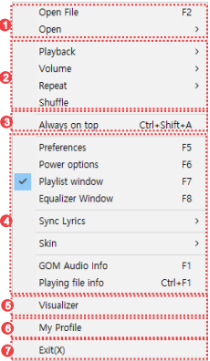
-
①
Load File
Can open a video file in the PC or connect to a video on the internet. Favorites feature can be used to register frequently played videos for easy playback.
-
②
Playback Preferences
Can set audio playback related issues.
-
③
Always On Top
GOM Audio is always on top of other programs when enabled.
-
④
User Preferences
Can set the basic program settings or view playback info, program info, file info, etc.
-
⑤
Visualizer
Can view the visualizer for the audio file being played.
-
⑥
User Preferences
Can set the basic program settings or view playback info, program info, file info, etc.
-
⑥
Exit
Exits the program.